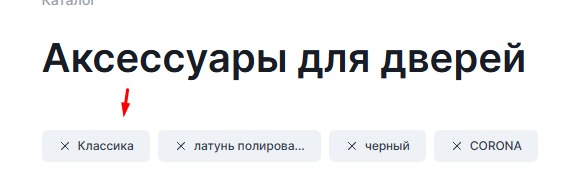
html
<div class="smart_filter_checked_items" id="filterCheckedItemsBox"></div>script.js
function JCSmartFilter(ajaxURL, viewMode, params)
{
    // ...
    this.filterContainer = document.querySelector('#catalogFilter')
    this.checkboxes = this.filterContainer.querySelectorAll('form input[type="checkbox"]');
    // Проверяем выбранные фильтры при загрузке.
    document.addEventListener('DOMContentLoaded', () => {
        this.filterMarkedItemsBox = document.querySelector('#filterCheckedItemsBox') ?? null;
        this.filterMarkedItemsOnLoad()
    });
}

/**
 * Рендерим кнопки при загрузке страницы.
 */
JCSmartFilter.prototype.filterMarkedItemsOnLoad = function() {
    if (this.checkboxes) {
        this.checkboxes.forEach(checkbox => {
            if (checkbox.checked) {
                this.filterMarkedItemsCheck(checkbox, true)
            }
        })
    }
}

/**
 * Проверяем есть ли уже кнопка в контейнере?
 */
JCSmartFilter.prototype.filterMarkedItemsCheck = function(checkbox, onLoad = false) {
    let existingButton = this.filterMarkedItemsBox.querySelector(`[data-filter-checked="${checkbox.id}"]`);

    if (onLoad) {
        if (!existingButton) {
            let newButton = this.filterMarkedItemsButtonCreate(checkbox);
            return this.filterMarkedItemsButtonRender(newButton);
        } else {
            existingButton.onclick = () => this.filterMarkedItemsButtonRemoveAndSubmit(existingButton)
            return existingButton
        }
    }

    if (checkbox.checked) {
        if (!existingButton) {
            let newButton = this.filterMarkedItemsButtonCreate(checkbox);
            this.filterMarkedItemsButtonRender(newButton);
        }
        return;
    }

    if (existingButton) {
        existingButton.remove();
    }
};

/**
 * Создаем кнопку.
 */
JCSmartFilter.prototype.filterMarkedItemsButtonCreate = function(checkbox) {
	let button = document.createElement('button');
	button.type = 'button';
	button.setAttribute('data-filter-checked', checkbox.id);

	let text = checkbox.dataset.labelText;
	let truncatedText = text;

	// Обрезаем текст, если длина больше N символов
	if (text.length > 15) {
		truncatedText = text.substring(0, 15) + '...';
	}

	button.textContent = truncatedText;
	button.title = text; // Полный текст в атрибут title

	return button;
};

JCSmartFilter.prototype.filterMarkedItemsButtonRender = function(newButton) {
    newButton.onclick = () => this.filterMarkedItemsButtonRemoveAndSubmit(newButton);

    if (this.filterMarkedItemsBox === null) {
        this.filterMarkedItemsBox = document.querySelector('#filterCheckedItemsBox')
    }
    this.filterMarkedItemsBox.appendChild(newButton)
};
/**
 * При клике по выбранным фильтрам убираем checked в фильтре.
 */
JCSmartFilter.prototype.filterMarkedItemsButtonRemoveAndSubmit = function(button) {
    let checkbox = this.filterContainer.querySelector(`#${button.dataset.filterChecked}`);

    if (checkbox) {
        checkbox.click()
    }
};
template.php
Добавляем чекбоксу в фильтре атрибут data-label-text
Можно забирать текст кнопки и из значения <span>, но зачастую просят в выбранные фильтры прописывать другие значения, поэтому так более удобно.
// ... код выше
default://CHECKBOXES
<input
    type="checkbox"
    value="<? echo $ar["HTML_VALUE"] ?>"
    data-label-text="<?=$ar["VALUE"]?>"
    data-seo-name="<?=$seoName?>"
/>
Если нужна перезагрузка
Если фильтр перезагружает страницу сразу (параметр "INSTANT_RELOAD" => "Y" ), то тут взятки гладки.
А если требуется перезагрузить страницу руками, то добавляем
-
Флаг перезагрузки страницы в конструктор
function JCSmartFilter(ajaxURL, viewMode, params) { // ... // флаг перезагрузки this.needReload = false; // Нода каталога (опционально, мне нужна чтобы навешивать loader) this.nodeCatalog = document.querySelector('[data-catalog]') ?? null; } -
В методе
filterMarkedItemsButtonRemoveAndSubmitпереключаем флагif (checkbox) { this.needReload = true; checkbox.click() } -
Ловим
this.needReloadв функции лоадераJCSmartFilter.prototype.showLoaderForElement = function(action = 'add') { if (!this.nodeFilter || !this.nodeCatalog) { return; } const targetElement = this.needReload ? this.nodeCatalog : this.nodeFilter; toggleLoader(targetElement, action); // Ваша функция, которая навешивает loader }; -
И отслеживаем в методе
JCSmartFilter.prototype.postHandler = function (result, fromCache)
{

// Если требуется перезагрузка - делаем это сразу
if (this.needReload && result.FILTER_URL) {
    const href = BX.util.htmlspecialcharsback(result.FILTER_URL);
    window.location.href = href;
    return; // Прерываем выполнение остального кода
}

};
Если нужна перезагрузка 2
В методе выше мы отправляем ajax-запрос и формируем ссылку, так как мы это сделали, нажав на чекбокс фильтра. И это безопасный и правильный подход.
В частных случаях, когда это отрабатывает медленно (слабая конфигурация, нагроможденные фильтры и т.д.) можно пойти другим путем. Не отправлять ajax-запрос и не дожидаться его ответа.
Возможны баги, следует тестировать и допиливать конкретно под проект.
Приступаем!
template.php
Добавляем чекбоксу в фильтре атрибут data-filter-code
// ... код выше
default://CHECKBOXES
<input
    // ... другие атрибуты
    data-filter-code="<?= strtolower($arItem['CODE']) ?>"
/>
script.js
Изменяем метод filterMarkedItemsButtonRemoveAndSubmit Дополнительно получаем код и значение свойства.
JCSmartFilter.prototype.filterMarkedItemsButtonRemoveAndSubmit = function(button) {
    let checkbox = this.filterContainer.querySelector(`#${button.dataset.filterChecked}`);

    if (checkbox) {
        this.needReload = true;

        // Получаем код и значение фильтруемого свойства
        const filterCode = checkbox.dataset.filterCode;
        const filterValue = checkbox.dataset.labelText.toLowerCase();

        // Сразу перезагружаем без AJAX-запроса
        this.reloadPageDirectly(filterCode, filterValue);
    }
};
Дописываем остальные методы
/**
 * Прямая перезагрузка без AJAX
 */
JCSmartFilter.prototype.reloadPageDirectly = function(removeCode, removeValue) {
    this.showLoaderForElement();

    // Строим новый URL без удаляемого фильтра
    window.location.href = this.buildFilterUrl(removeCode, removeValue);
};

/**
 * Построение URL фильтра с удалением конкретного фильтра
 */
JCSmartFilter.prototype.buildFilterUrl = function(removeCode, removeValue) {
    let currentUrl = window.location.pathname;

    if (currentUrl.includes('/filter/')) {
        const urlParts = currentUrl.split('/filter/');
        const baseUrl = urlParts[0];

        if (urlParts.length > 1) {
            let filterPart = urlParts[1];
            filterPart = filterPart.replace(/\/apply\/?$/, '');
            const filters = filterPart.split('/').filter(part => part.length > 0);

            // Декодируем компоненты для сравнения
            const decodedFilters = filters.map(filter => decodeURIComponent(filter));
            const filterToRemove = `${removeCode}-is-${removeValue}`;

            // Создаем новый массив для отфильтрованных фильтров
            const resultFilters = [];

            for (let i = 0; i < filters.length; i++) {
                const filter = filters[i];
                const decodedFilter = decodedFilters[i];

                // Если это фильтр, который нужно полностью удалить
                if (decodedFilter === filterToRemove) {
                    continue; // Пропускаем этот фильтр
                }

                // Если фильтр содержит несколько значений через "or"
                if (decodedFilter.includes('-or-') && decodedFilter.startsWith(`${removeCode}-is-`)) {
                    // Разделяем фильтр на код и значения
                    const parts = decodedFilter.split('-is-');
                    if (parts.length < 2) {
                        resultFilters.push(filter);
                        continue;
                    }

                    const code = parts[0];
                    const values = parts[1].split('-or-');

                    // Удаляем нужное значение
                    const filteredValues = values.filter(value => value !== removeValue);

                    // Если значения остались, формируем новый фильтр
                    if (filteredValues.length > 0) {
                        // Кодируем значения обратно для URL
                        const encodedValues = filteredValues.map(value => encodeURIComponent(value));
                        resultFilters.push(`${code}-is-${encodedValues.join('-or-')}`);
                    }
                    // Если значений не осталось, не добавляем фильтр
                } else {
                    // Оставляем фильтр без изменений
                    resultFilters.push(filter);
                }
            }

            if (resultFilters.length > 0) {
                return `${baseUrl}/filter/${resultFilters.join('/')}/apply/`;
            } else {
                return `${baseUrl}/`;
            }
        }
    }

    // Если это обычный URL с параметрами, или что-то пошло не так
    return currentUrl;
};
Теперь фильтры удаляются минуя ajax-запрос, что в некоторых случаях работает в несколько раз быстрее.